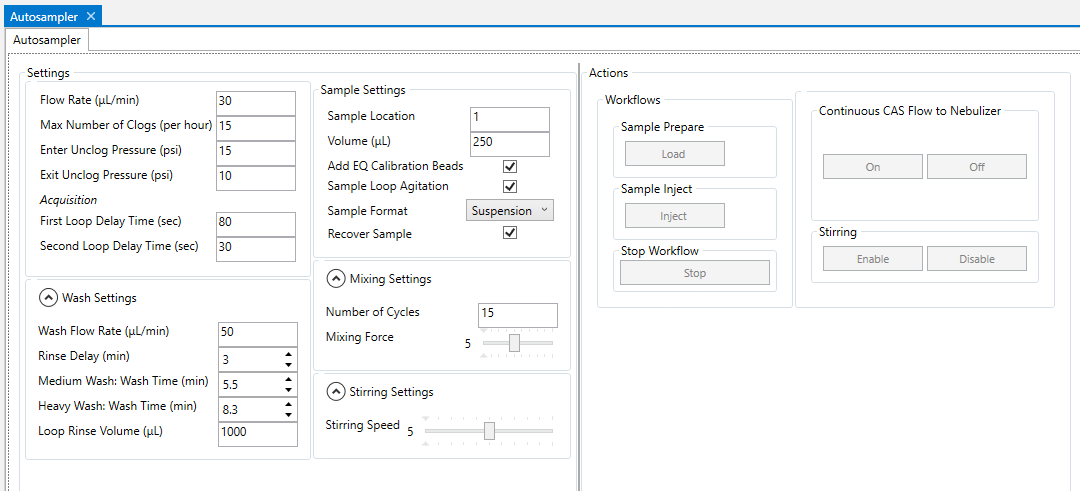
The Autosampler tab displays all Autosampler settings available to CyTOF® Software Administrators and Users, including:
• Automatic unclogging settings
• Wash settings
• Sample mixing and stirring settings
• Controls for independent Autosampler control and troubleshooting, such as:
• Sample settings
• Sample loading and injecting Autosampler actions
• Turning continuous Maxpar® Cell Acquisition Solution Plus (CAS Plus) flow on and off
• Turning stirring on and off
NOTE During sample acquisition the settings defined in the Settings Templates are applied to your samples.
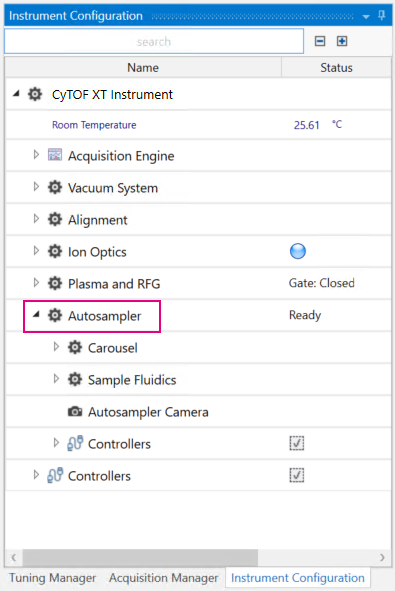
To display Autosampler settings go to Instrument Configuration and click Autosampler.
Name |
Description |
Settings |
|
Flow Rate (µL/min) |
The rate sample injection and Maxpar Cell Acquisition Solution Plus (CAS Plus) flow from the Autosampler to the nebulizer. The default flow rate, and necessary flow rate for instrument tuning and data acquisition, is 30 μL/min. This setting can be changed by a CyTOF Administrator, only for troubleshooting purposes. IMPORTANT A change to flow rate made by a CyTOF Administrator affects all accounts. CyTOF Users cannot change the flow rate. Be sure to set the flow rate back to 30 μL/min before resuming tuning or data acquisition activities.
|
Max Number of Clogs (per hour) |
The maximum number of clogs that can occur within an hour before acquisition is stopped.
|
Enter Unclog Pressure (psi) |
The pressure at which the automatic unclogging routine is initiated. The
default value is 15 psi.
|
Exit Unclog Pressure (psi) |
The pressure at which the automatic unclogging routine exits and acquisition
resumes.
|
First Loop Delay Time (sec) |
The acquisition delay applied after injection of the first sample loop starts. This delay allows time for the sample to load and travel from the sample loop to the nebulizer.
|
Second Loop Delay Time (sec) |
The acquisition delay applied between loops to account for the delay between the end of the previous loop and the start of the next. The time required will be less than the First Loop Delay Time.
|
Wash Settings |
|
Wash Flow Rate (µL/min) |
The default flow rate of liquid from the Autosampler to the nebulizer during wash cycles. The default Wash Flow Rate is 50 µL/min. This setting is independent of the acquisition flow rate. |
Rinse Delay (min) |
CAS Plus rinse time that precedes Medium and Heavy wash cycles to rinse the nebulizer during manually initiated wash cycles. Equivalent to a Light wash cycle, which is CAS Plus rinse only. |
Medium Wash: Wash Time (min) |
The Medium wash duration in minutes. Washing solution followed by CAS Plus rinse. |
Heavy Wash: Wash Time (min) |
The Heavy wash duration in minutes. Washing solution with pulsing to clear the nebulizer, followed by CAS Plus rinse. |
Loop Rinse Volume (µL) |
The volume of Maxpar Water for CyTOF XT (PN 201242) used for the high speed loop flush. For Medium and Heavy washes, the system rinses the loop after the acid wash is finished. This is used for all 3 washes. |
Sample Settings |
|
Sample Location |
The location of the sample in the carousel.
|
Volume (µL) |
The sample volume in µL. NOTE The sample volume is injected in 250 µL aliquots (the sample loop volume). The volume of the final loop includes an additional 12 µL to account for the Autosampler Nebulizer Line (PN 117784), so the total injection volume is Volume + 12 µL.
|
Add EQ Calibration Beads |
When selected, EQ™ Six Element Calibration Beads (or EQ Four Element Calibration Beads for samples prepared with Maxpar® Direct™ Immune Profiling Assay™), at 10% of the total sample volume, are added to the sample by the Autosampler.
|
Sample Loop Agitation |
Check to agitate the sample loop for 400 ms every 2 sec during injection and washing. This setting is recommended to prevent cells from settling in the sample loop during acquisition and to reduce the risk of clogs.
|
Sample Format |
Choose Suspension for cell samples that contain suspension solution and require mixing. Choose Pellet for cell pellet samples that require resuspension.
|
Recover Sample |
Check to have the remaining sample returned to the tube after acquisition is complete or interrupted. NOTE Approximately 30 µL of CAS Plus is returned to the tube with the sample.
|
Mixing Settings |
|
Number of Cycles |
The number of times the probe aspirates and expels the sample during mixing.
|
Mixing Force |
The relative velocity of the sample when dispensed into the tube during mixing. The default setting is 10.
|
Stirring Settings |
|
Stirring Speed |
The speed at which the probe stirs the sample. The default setting is 5. |
Name |
Description |
Workflows |
|
Sample Prepare (Load) |
Loads solution or sample from the tube specified in Sample Location into the sample loop. |
Sample Inject (Inject) |
Injects the solution of sample from the sample loop into the system. |
Stop Workflow (Stop) |
Stops the current workflow. |
Continuous CAS Flow to Nebulizer (On/Off) |
Starts and stops continuous flow of CAS Plus to the nebulizer. |
Stirring (Enable/Disable) |
Starts or stops stirring of the sample with the probe. |