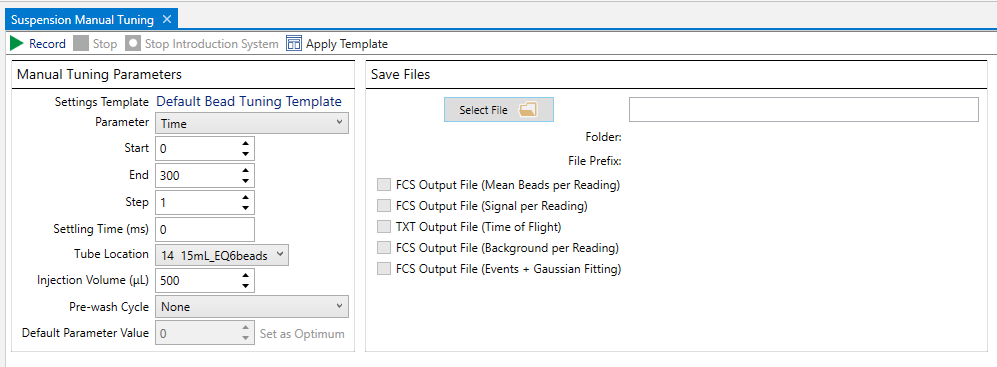
CyTOF Software Administrators and Users can use Manual Tune to ramp individual parameters for troubleshooting purposes.
IMPORTANT Manual tuning is intended for troubleshooting purposes as advised by Fluidigm Service and Support.
To ramp a parameter using Manual Tune
NOTE If the system is not started, on the Instrument Control tab, click Start. Wait 30 min for the system to warm up and for plasma to stabilize.
1 On the Instrument Control tab, click Manual Tuning.
2 On the Suspension Manual Tuning tab, under Manual Tuning Parameters, choose the parameter you want to ramp:
• Time
• Nebulizer Gas Flow
• Makeup Gas Flow
• Current
IMPORTANT (CyTOF Administrators only) Do not scan Detector P unless instructed by Fluidigm Technical Support for troubleshooting purposes.
3 Enter values for the following settings:
Setting |
Description |
Start |
The value at which the first reading is taken. |
End |
The value at which the last reading is taken. |
Step |
The increment at which readings within range are taken. |
Settling Time (ms) |
The time between readings. |
Tube Location |
The location of the calibration beads in the Autosampler carousel. |
Injection Volume |
The volume of calibration beads to be injected for this tuning. |
Pre-wash Cycle |
The wash cycle run after parameter ramping is complete. |
4 (Optional) Save output files.
a Under Save Files, click Select File. Enter a name for the file and click OK.
b Choose the file types you want to save:
• FCS Output File (.fcs)
• Mean Beads per Reading (mean bead signal per reading/step)
• Signal per Reading (mean signal average per reading/step)
• Background per Reading (mean background signal per reading/step)
• Events + Gaussian Fitting
• TXT Output File (.txt)
• Time of Flight (time-of-flight values and corresponding signal intensities)
5 Click Record to start Manual Tune. The introduction system starts automatically and Data Display is opened. The plots update while waiting for beads to reach the detector.
6 After parameter ramping is complete, identify the reading that produced the highest-intensity signal for all bead channels on the Mean Beads per Reading plot. (For Makeup Gas Flow, identify the reading that produced the highest-intensity signal for all bead channels with <3% oxides.)
Enter that value in the Default Parameter Value field and click Set as Optimum (displayed when a parameter other than Time is ramped) to apply the new setting.